Should I Block My Ex? Block, Mute, Restrict, Unfollow or Archive Compared
Should I block my ex? Block vs mute vs restrict vs unfollow vs archive, what each does on iPhone and social apps, how to choose, and when blocking is not safe.
 By the UnLink Editorial Team · General educational guidance, not therapy
Block your ex if their messages or posts keep pulling you back, if you keep checking their profile, or if contact hurts your recovery. Mute or unfollow if seeing their life is the only problem. Blocking is a boundary, not an immature act by default. If there was abuse, stalking or coercion, plan safety first.
- Blocking stops their calls and messages reaching you, but on iPhone it does not stop yours reaching them: Apple says outgoing calls and messages to blocked contacts are allowed.
- Muting, unfollowing and archiving cut what you see without a full cut-off, which helps only if you then stop looking.
- Choose by what pulls you back: messages, their posts, or your own checking. A mute does nothing for your own checking, so that usually points to a block.
- Blocking is a boundary tool. Whether it is immature depends on the reason you use it, not on the act.
- If the relationship involved abuse, stalking or coercion, change contact only after safety planning.
Should I block my ex? A short answer
Yes, if any one of these is true: you keep opening their profile after muting it, their messages keep arriving and you keep answering, you are drafting texts at night, or contact with them leaves you worse for days. Blocking is a boundary for your own recovery, and it is easier to undo than the damage of another round of checking.
Not yet, or not at all, if the breakup was calm, you rarely look, and you share a workplace, a friend group or a child where a block would create friction. A lighter option may be enough, and you can move up a step later. And if there was abuse, stalking or threats, do not block on impulse: read the safety section below first.
What blocking actually does
Blocking is a single switch with a wide effect, and it behaves differently on the phone than inside each app. On an iPhone, Apple says blocking a contact in Phone, FaceTime, Messages or Mail blocks them across all four, and it applies on your other Apple devices signed in to the same Apple Account. It covers Apple apps only. For Instagram, WhatsApp or anything else you block them in that app separately.
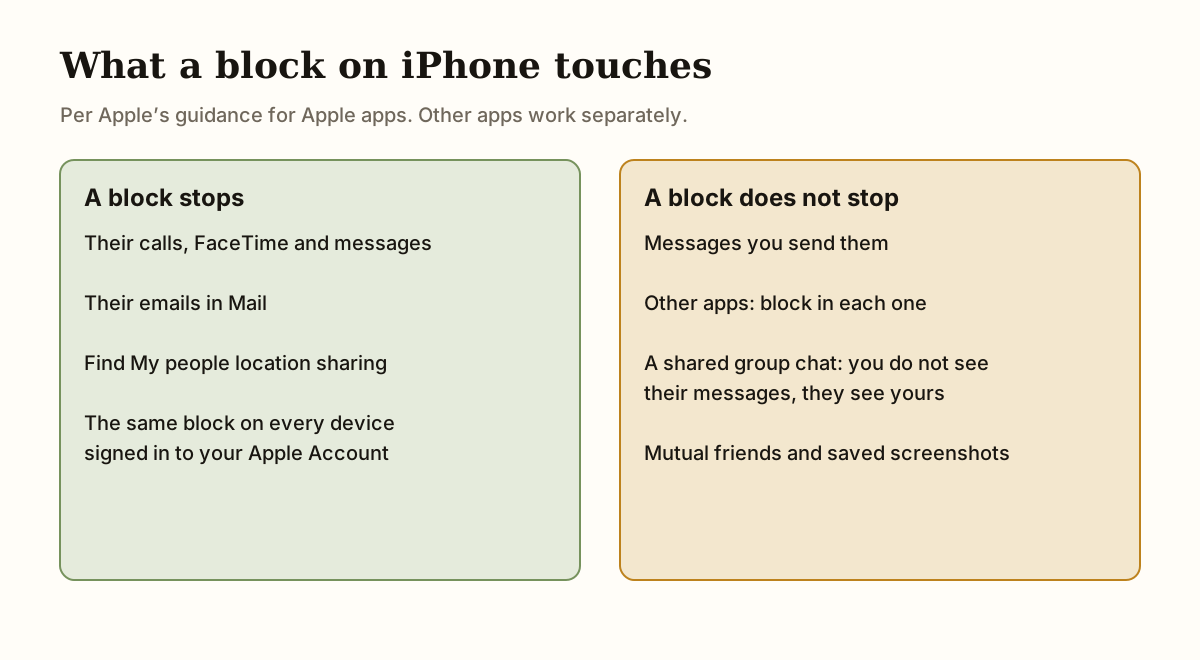
It also does less than people expect. Apple says outgoing phone calls, messages and emails to a blocked contact are still allowed, so a block does not stop you from texting them. In a group conversation you can still share a chat with someone you blocked: you will not see their messages, but they will see yours. Blocking also stops Find My location sharing straight away. On iOS 18 and earlier Apple says they are notified that you stopped sharing, and on iOS 26 it says they are not. Shared Family Sharing groups are an exception, because they can still see your devices in Find My.
None of this deletes shared photos, memories or the thread itself. That is why blocking can feel like relief and loss at once. You lose the option to see what they post, which is often the point, and you lose the impulse to check.
Block vs mute vs restrict vs unfollow vs archive
These options sit on a scale from lightest to most final. Names and behavior vary between apps and iOS versions, so check the menu on your own device. The table describes the general pattern rather than every platform’s settings. Pick the lightest option that actually removes your trigger.
| Option | What it does | Fits when | Watch out for |
|---|---|---|---|
| Archive a thread | Moves the conversation out of your main list; new messages can still arrive | The thread itself is the trigger | One search and it is back |
| Mute | Hides their posts or silences their notifications, usually without telling them | You want distance from updates but share a group, a workplace or a building | Their profile is still one tap away |
| Unfollow | Their posts leave your feed; you stay connected | Seeing their posts is the main problem | You can still search for them |
| Restrict (some apps) | Moves their messages and comments out of sight | They keep reaching out and you want less drama | Not on every app, and weaker than a block |
| Block | Stops their calls and messages reaching you; on social apps limits profile access both ways | Contact keeps coming, you keep checking, or you need a clean break to recover | On iPhone it does not stop you texting them; other apps need their own block |
Is blocking your ex immature?
Not by default. It is a boundary, and boundaries are a normal part of recovery. The question is what you are doing with it. Blocking to protect your attention, sleep or sense of self is a different act from blocking to punish someone, provoke a reaction or make a point you want them to see.
A useful check: could you explain the block to a neutral friend in one sentence? “I am taking a break from contact so I can recover” is a boundary. “I want them to feel how it feels to be ignored” is a message, and it usually keeps the loop running. If you would be fine with them never noticing, you are probably blocking for the right reason.
How to decide: match the option to what pulls you back
You do not need the perfect setting. You need one that protects your recovery this week, with a date to revisit it. Start by naming the trigger. Is it their messages, their posts, or your own checking? Then match the option to it.
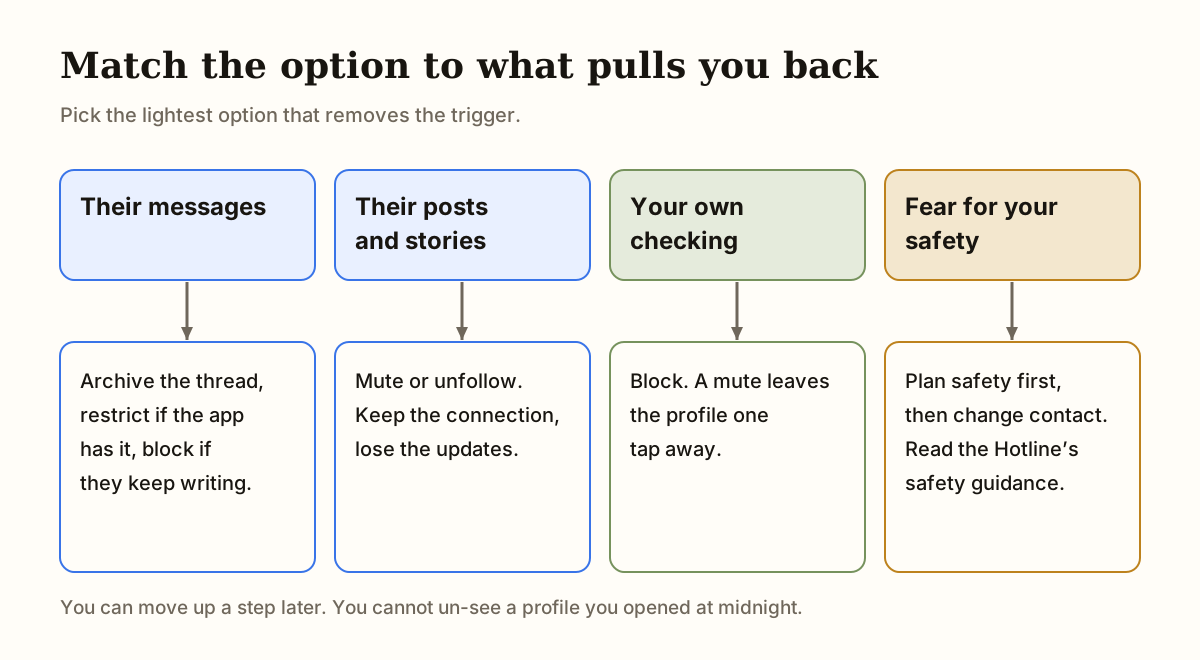
If it is their messages, archive, restrict or block, depending on how often they write. If it is their posts, mute or unfollow. If it is your own checking, a block usually works better than a mute, because the mute leaves the profile one tap away. And if there is any fear involved, safety planning comes before any setting.
- Name the trigger: messages, posts, profile checks or late-night scrolling.
- Choose the lightest option that removes that trigger.
- Set a short review date, such as two weeks, to check whether it is working.
- If it is not working, move one step up rather than waiting for a crisis.
- Write down the reason so future-you knows why the decision was made.
Signs blocking is the right step, and when a mute is enough
Many people wait too long to block because it feels dramatic. It is often most useful once the lighter options have failed. If the pull is mostly about texting, how to stop texting your ex sets out the steps that come before a block, and if they reach out after you have stepped back, what to do when your ex texts you during no contact has scripts for replying or not replying.
A mute or unfollow can be enough if the breakup was calm, the only problem is seeing their life, and you share a friend group or workplace where a block would make things awkward. It still has to be honest. If you mute them and then look at their stories every evening, the step is not doing its job. Marshall (2012) found that more monitoring of an ex’s Facebook was associated with more distress and less personal growth after a breakup, although the study is correlational. The aim is fewer checks, not a new way to watch from a distance.
- You have muted or unfollowed them, and you still open their profile or search their name.
- You have set a no-contact rule, and you keep finding reasons to send one more message.
- They keep reaching out through new accounts, mutual friends or new numbers, and you answer each one.
- Each notification from them derails your day, your work or your sleep.
- You are reading old messages or rewatching their stories when the urge hits at night.
Will they know, and what if I want to unblock later?
Most apps do not send a notice when you block, mute or unfollow, though a message that never gets a reply or a profile that disappears can be a clue. Behavior varies by app, so check how the option works where you use it. Do not block to send a signal. If a signal is the point, the plan has drifted from recovery to performance.
Blocking is reversible, and that is the problem at 1 a.m. On iOS 26 the central list lives under Settings, Privacy & Security, Blocked Contacts. Before you unblock anyone, write the reason in your notes, wait until the review date, and ask whether you want to see something or say something. If you do unblock and then slip, what to do if you break no contact covers the next step without wiping the days you protected.
Co-parents, coworkers, shared friends and shared accounts
A block is simple when nothing ties you together. When something does, you need a narrower boundary. For a shared child, a lease or a job, keep one channel for practical messages, mute everything else, and use modified no contact as the pattern. Archive the thread rather than delete it if you might need a record later.
Shared friends are the other leak. A block does not change what a mutual friend tells you, and group chats stay open. Say once that you are stepping back and will not pass messages either way, then stop asking for updates. The guide on how to stop checking your ex’s social media covers that habit. Do not forget the quiet ones: shared streaming logins, photo albums, location sharing and a family phone plan.
Safety comes first when the relationship involved harm
Blocking is not always the safest move. If the relationship involved abuse, stalking, threats or coercion, changing contact can change the risk, and a sudden block can provoke a response. Plan before you act. The National Domestic Violence Hotline publishes safety planning guidance, and in the US you can reach it on 1-800-799-7233 or by texting START to 88788. Apple’s Personal Safety guide also has a section on documenting suspicious or harmful activity, and iOS 26 adds a Safety Check step while you block.
Safety planning applies to shared housing, custody, work and money too. If you are in crisis or cannot keep yourself safe, call local emergency services, or in the US call or text 988. Other countries’ lines are on our safety page. The guide on no contact with a narcissist covers the surge of contact that can follow a block.
What to say to friends, and how to keep your own record
You do not owe anyone a full account. A calm line works: you have stepped back from contact for your own recovery, and you will not pass messages between you. If someone pushes, say you are not discussing it.
Many people worry that blocking means losing something, such as a reminder of why they left. You can keep your own record without keeping their number on your phone: write your reasons down and store unsent letters somewhere private. The private decision tool can help you check a choice before you act. In UnLink, a free no-contact tracker for iPhone, the Vault on Premium holds reasons, reminders and unsent letters on your device.
Step-by-step plan
- Check whether there is any safety concern
If the relationship involved abuse, stalking, threats or coercion, read safety planning guidance before you change contact, and talk to someone you trust about the timing.
- Name the trigger
Decide whether the main problem is their messages, their posts, their profile, or your own late-night checking.
- Choose the lightest option that removes the trigger
Archive the thread for messages, mute or unfollow for posts, restrict where available for unwanted messages, and block when lighter options have not worked or contact keeps coming.
- Block in every place they can reach you
On iPhone, the block covers Phone, FaceTime, Messages and Mail. Block them separately in each social or messaging app, and remove the shortcuts you use to check, such as a bookmark or pinned profile.
- Set a review date
Choose a date about two weeks away to check whether the option is working, and write it in your calendar or your notes.
- Move up one step if needed
If you are still checking or still being pulled back, move to the next option rather than waiting for a crisis.
You do not have to solve the whole relationship tonight. Take one private step that creates space between the feeling and the action.
Check what counts as contact →Common questions
Should I block my ex?
Block if their messages or posts keep pulling you back, if you keep checking their profile after muting it, or if contact feels unsafe. If the breakup was calm and you only want fewer updates, muting or unfollowing may be enough. If there was abuse, stalking or coercion, get safety planning before you change contact.
What is the difference between blocking and muting an ex?
Blocking stops their calls and messages reaching you, and on social apps limits profile access in both directions. Muting hides their posts or silences notifications, and you can still look at their profile. Blocking is more final, while muting keeps the option of seeing their updates.
Is blocking your ex immature?
Not by default. Blocking is a boundary, and boundaries are a normal part of recovery. It becomes unhelpful when the reason is to punish or provoke a reaction. A good check is whether you could describe the block to a neutral friend as a break from contact for your own recovery.
Does blocking my ex stop me from texting them?
Not on an iPhone. Apple says outgoing phone calls, messages and emails to blocked contacts are allowed. A block only stops theirs reaching you, so pair it with a limit that another person holds if you want to stop yourself.
Should I unfollow my ex or block them?
Unfollow if their posts are the main trigger and you do not need the wider block. You stay connected, but their updates stop appearing. If you still open their profile after unfollowing, a block fits better, because the profile is no longer one tap away.
Will my ex know if I block or mute them?
Most apps do not announce a block, mute or unfollow, but a block can be noticed when messages go unanswered or a profile disappears. Behavior varies by app. On iPhone, Find My location sharing stops when you block, and on iOS 18 and earlier Apple says the person is told that sharing stopped.
Can blocking make things worse if the relationship was abusive?
It can. In an abusive, controlling or stalking situation, a sudden change in contact can change the risk. Read safety planning guidance from the National Domestic Violence Hotline before you act, and think about who you can tell about your plan.
Is it okay to unblock my ex later?
Yes, but do it on purpose, not at 1 a.m. Write down why, wait until your review date, and ask whether you want to look or to talk. If you slip, a slip does not erase the days you protected.
If contact involves threats, stalking, coercion, shared children, housing or immediate safety, a general no-contact rule may not fit. Read the safety guidance and seek qualified local help where appropriate.
Sources and further help
- Apple Support: Block, screen, and filter communications (Personal Safety User Guide)
- Marshall TC (2012), Facebook surveillance of former romantic partners: associations with postbreakup recovery and personal growth
- National Domestic Violence Hotline: safety planning
- 988 Suicide & Crisis Lifeline
Research is cited to explain general patterns, not to diagnose or predict any individual outcome. Sources do not endorse UnLink. Read our editorial principles.
Keep this support one tap away.
UnLink is a free, private no-contact tracker for iPhone: count your days, get through urges and restart without losing your history.