Best No Contact Apps in 2026: 7 Compared Honestly
Compare 7 no contact apps with App Store data checked 15 October 2026: price model, ratings, platforms, privacy and who each suits. We make UnLink, one of them.
 By the UnLink Editorial Team · General educational guidance, not therapy
The best no contact app counts your days, helps in the minute an urge hits, and is clear about price and privacy. On the US App Store (checked 15 October 2026), No Contact: Breakup Recovery has the most ratings, while UnLink is new, free to start, needs no account and keeps data on your iPhone.
- No single app is best for everyone: the most-rated apps in this comparison lean on AI chat, community and subscriptions, while UnLink is new, has no ratings yet and is built around privacy.
- Every app in the table is free to download, but most need a subscription for full access, so read the price model on the listing before you start.
- Only three apps we checked have a Google Play listing we could verify: Get Over Him, No Contact: AI Breakup Help and No Contact Tracker: After Us. UnLink is iPhone only.
- App Store privacy labels differ a lot between no contact apps, and of the seven only UnLink states that no account is required.
- No app replaces professional support, and anyone facing a safety concern should contact a crisis line or emergency services.
What should a good no contact app do?
The urge to text an ex can feel physical rather than like a simple thought. In people recently rejected by a partner, viewing that person’s photo activated brain regions linked to reward, motivation and craving (Fisher et al., 2010). Support that arrives in the moment matters more than good intentions made during the day.
Most apps in this space are a day counter with extras. Use this checklist before you download anything:
- A day counter with milestones, so you can see progress without treating every day as a test.
- Urge support you can open at the exact moment the pull is strongest, not only during a daily check-in.
- Mood and trigger logging, so you notice patterns such as messaging late at night after a drink.
- A restart that keeps your history, so a slip resets the streak without erasing what you have learned.
- A private place for unsent messages and your reasons, so those words have somewhere to go besides your ex’s inbox.
- Clear pricing, and privacy you can check: whether an account is needed, what is collected and where it is stored.
- Safety-aware guidance that recognises some situations need more than a counter, such as abuse, stalking or shared children.
- Honest framing that never promises to get your ex back.
How do the best no contact apps compare?
Here are seven no contact apps side by side, using only what the US App Store listings and Apple’s search data show on 15 October 2026. Six are the most-rated apps built for no contact and breakup recovery that we found. The seventh is UnLink, which we make, so read our own row with that in mind. The method is in the section below.
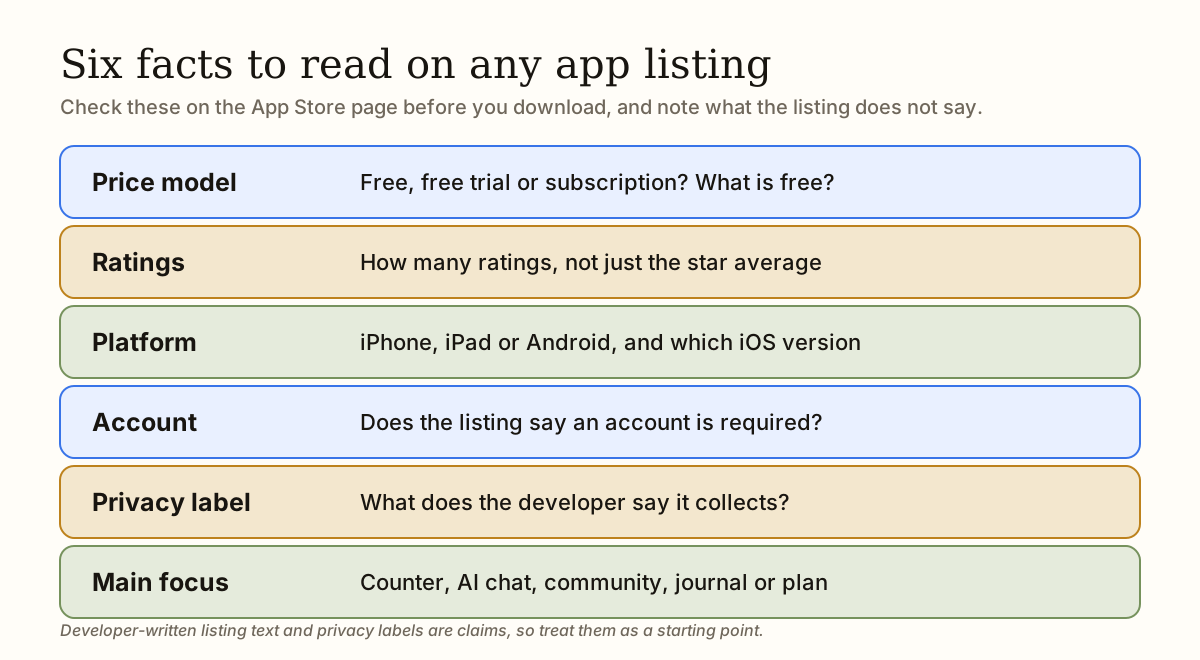
Two cautions. A rating count measures how many people rated an app, not how well it works. And “not stated” means the listing does not say, which is different from “no”.
| App | Price model (per listing) | Rating and count | Platforms | Account required | Main focus (per listing) |
|---|---|---|---|---|---|
| UnLink: No Contact Tracker | Free to download, with core tools free and an optional subscription for premium features | New: no ratings yet | iPhone, iOS 17.0 or later. Not on Android | No, per the listing | Day counter, urge support, mood and trigger logging, and data that stays on the device |
| No Contact: Breakup Recovery (Ember Labs) | Free to download; auto-renewing subscription, with a free trial mentioned | 4.7 from 2,266 ratings | iOS 15.1 or later. Android not verified | Not stated | Streak, AI coach, panic button, evidence vault, programs, and a way to connect with others |
| No Contact Tracker: Lockdown (Calico Studio) | Free to download; subscription required for premium features | 4.8 from 572 ratings | iOS 15.5 or later. Android not verified | Not stated | Streak, urge log, unsent texts, journal and an AI coach |
| Get Over Him - Breakup Healing (Dial Labs) | Free to download; the listing says there are no free features | 4.6 from 477 ratings | iOS 18.6 or later. Android: yes | Not stated | AI companion (text and voice), text simulator, lessons, quizzes and a no contact counter |
| No Contact Tracker (Appycron) | Free to download; the listing calls it paid-only, with a subscription for all features | 4.8 from 457 ratings | iOS 26.0 or later. Android not verified | Not stated | Timer, community, achievements, mood journal and 20+ lectures |
| Zero Contact: Heal Faster (Reframes Group) | Free to download; weekly and yearly auto-renewing subscriptions, trial possible | 4.7 from 393 ratings | iPhone and iPad, iOS 15.1 or later. Android not verified | Not stated | Streak tracker, a “fake text” that never sends, guided breathing and journaling |
| BREAKFREE: No Contact Tracker (Ready Set Joy) | Free to download; subscription required for full access | 4.8 from 304 ratings | iOS 18.0 or later. Android not verified | Not stated | Streak, widgets, red-flag list, letters to an ex, articles and a recovery roadmap |
Which no contact app suits which person?
There is no ranking on purpose. The right app depends on what you need at 11 p.m., what you will pay, and how much data you want to hand over.
- No Contact: Breakup Recovery has by far the most social proof, with 2,266 ratings against none for UnLink. Its listing describes an AI coach and a way to connect with others. It suits you if you want a broad program with AI chat and community, and you are happy to subscribe.
- Lockdown is a focused streak and urge tool with an AI coach, and 572 ratings. It suits you if you want an urge log and a place for texts you should not send, and accept a subscription for the premium side.
- Get Over Him is built around an AI companion you can type or speak to, and the listing says there are no free features. It suits you if you want to talk things through with AI and will pay from the start. The wording is written about an ex called “him”, and it needs iOS 18.6.
- No Contact Tracker (Appycron) adds community, achievements and recorded lectures, and the listing calls it paid-only. It suits you if you want community and lectures. Check that your iPhone runs iOS 26.0, the minimum version Apple lists.
- Zero Contact keeps things simple: a streak, breathing exercises, journaling and a pretend text that is never sent. It suits you if you want a calm, simple tool, and its privacy label (below) says it collects no data.
- BREAKFREE pairs a streak with a red-flag list, letters to an ex and a three-phase roadmap. It suits you if you want articles and reminders of why it ended alongside the counter.
- UnLink suits you if you are on an iPhone, want the counter, urge support and logging free, and care more about no account and on-device data than about ratings, community or AI chat.
How does UnLink approach it, and where does it fall short?
UnLink is a no contact tracker for iPhone. It is new, and it is designed as one tool alongside other support, not as a replacement for professional help. Stated plainly:
- Free: a no contact day counter and recovery score, real-time urge support, mood and trigger logging, tracking of money saved and time reclaimed, a daily checklist for your next step, and relapse-safe restarts that keep your history.
- Premium, optional subscription: a private Vault for reasons, reminders, unsent letters and future-self notes, deeper insights, and an on-device Recovery Coach.
- Privacy: no account is required, recovery data stays on your iPhone, and there are no ads or third-party tracking.
- Limits: iPhone only, iOS 17 or later, English only, no ratings yet, and its listing does not describe a community or a cloud-based AI chat. If those matter most, several apps above do them and have more ratings.
What do the App Store privacy labels say?
A no contact app holds some of the most sensitive writing you will do. Apple requires developers to declare what they collect, and we read those declarations on 15 October 2026.
Developers write these labels themselves. A label covers data collection, not whether you must create an account, which is why the first table says “not stated” for most apps.
| App | What the listing declares |
|---|---|
| UnLink | Data Not Collected |
| No Contact: Breakup Recovery | Tracked: usage data. Linked: contact info, user content, identifiers, usage data. Also lists data not linked to you. |
| Lockdown | Tracked: identifiers. Linked: location, contact info, identifiers, usage data. Not linked: diagnostics. |
| Get Over Him | Tracked: usage data. Linked: contact info, user content, identifiers, usage data. |
| No Contact Tracker (Appycron) | Not tracked. Linked: purchases, user content, identifiers, usage data, diagnostics. Not linked: identifiers. |
| Zero Contact | Data Not Collected |
| BREAKFREE | Tracked: identifiers. Linked: contact info, identifiers. Not linked: contact info, user content, identifiers. |
What privacy questions should you ask any app?
The label is a start. Before you trust an app with messages you wanted to send and reasons for leaving, ask:
- Does it require an account or an email sign-in?
- Is my data stored on my device, or on a company’s server?
- Does it show ads or share data with third parties?
- Can I delete all my data, and does deleting the app remove it?
- Does the privacy policy say specifically what is collected, or is it vague?
- Can I lock the app, and can someone else with access to my phone read my entries?
- What happens to my data if I stop paying for a premium plan?
How we compared these apps
We searched the US App Store through Apple’s iTunes Search API on 15 October 2026, using the terms “no contact”, “breakup”, “no contact tracker”, “heartbreak”, “breakup recovery”, “get over ex” and “no contact rule”. From those results we kept apps built for no contact or breakup recovery support (not games or general journals), then took the six with the most ratings. UnLink was added as the seventh.
For each app we read the App Store listing and the API record, and recorded only what they state. We did not install or test the apps, so this compares listings and is not a review of how well each works.
The six facts are: price model, rating and rating count, platforms and minimum iOS version, whether an account is required, the privacy label, and main focus in neutral words. We did not compare prices, because each listing shows several price points. Android is marked “yes” only where we found a Google Play listing by the same developer (Get Over Him) or one linked from the developer’s own site; otherwise it says “not verified”, which does not mean the app is absent.
Three biases to know about. We make UnLink, rating counts favor older apps, and listings are marketing copy. Apps with similar counts that missed the table include NoContact - Heal & Move On (300 ratings), No Contact Tracker: After Us (256) and No Contact: AI Breakup Help (254). The last two have verified Google Play listings, so they matter if you use Android.
What else can you use instead of an app?
Most people combine a few tools. These are the main alternatives, with what each does well and where it falls short.
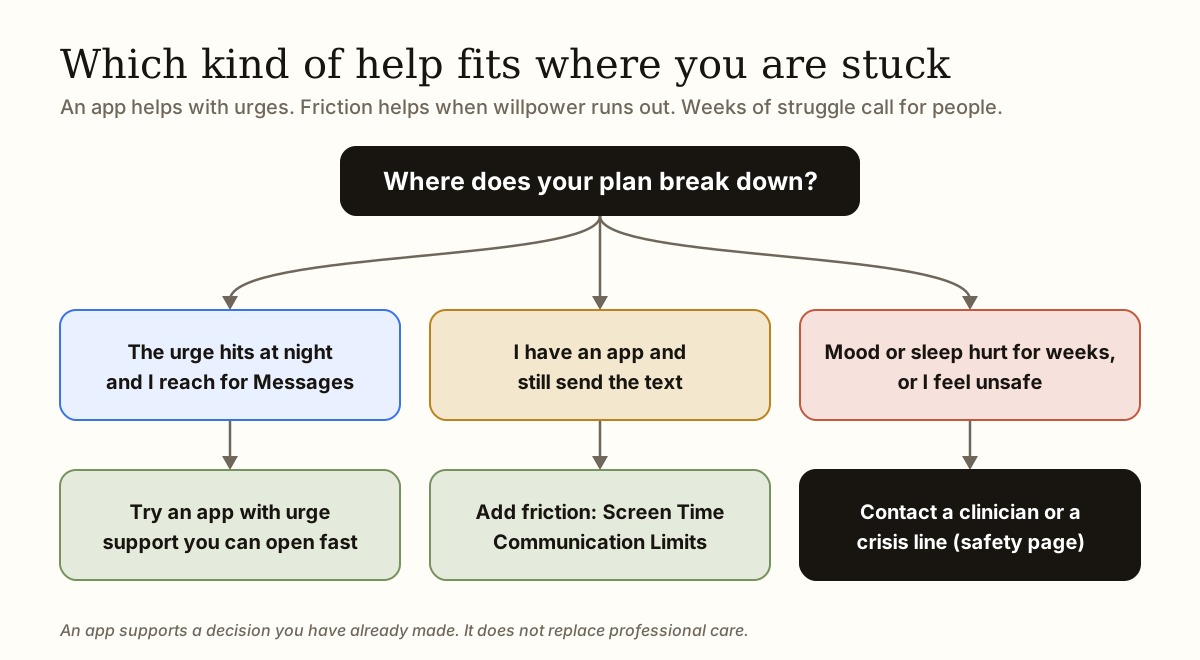
- Built-in iPhone tools. Screen Time Communication Limits can restrict messaging to the contacts you allow during set hours, and Focus modes can quiet notifications. Good for real friction. Limit: anyone who knows the Screen Time passcode can change the settings. Setup steps are in our guide to blocking yourself from texting someone.
- A general counter or habit app. DayCount, a productivity app, had 26,263 ratings (average 4.7) on 15 October 2026 and lists event counters, streaks and widgets. Good for a plain count. Limit: it is not built for breakups, so there is no urge support.
- Notes or journaling apps. Good for unsent letters and private reflection. Expressive writing about emotional experiences has been linked with benefits across a range of studies (Pennebaker, 1997). Limit: with no structure, a blank page on a bad night can turn into rereading old messages.
- Therapy or counselling. Good for personal support and for rumination, anxiety or low mood. Limit: it costs more than an app and is not there at 2 a.m., so you still need a plan for urges between appointments.
When is an app not enough?
An app can support a decision you have already made, but it cannot keep you safe on its own. Look for more help than an app if any of these apply. Our safety page lists more options.
- You feel unsafe, or your ex has threatened, followed or harmed you. The National Domestic Violence Hotline (1-800-799-7233, or text START to 88788) offers safety planning at thehotline.org. Leaving can raise risk, so plan your safety before any contact strategy.
- You are having thoughts of ending your life. In the US, call or text 988. In the UK and Ireland, Samaritans is on 116 123. In India, Tele-MANAS is on 14416. Elsewhere, contact your local emergency number.
- You are drinking or using other substances to cope with urges, or texting while under the influence has become a pattern.
- Sleep, work or daily life has been badly affected for several weeks.
- You share children, housing or a workplace with your ex and need a plan beyond a phone setting. Read our guide to modified no contact.
What free tools can you try first?
Whichever tool you choose, write an if-then plan, such as: “If I feel the urge to text after 11 p.m., then I will open my notes, read my reason, and put the phone in another room.” Specific if-then plans have been found to help people follow through on goals (Gollwitzer, 1999). More ideas are in what to do instead of texting your ex and how to stop texting your ex.
You do not need to download anything to start. These free tools on this site cover the most common needs, and the background is in what the no contact rule is:
- No contact calculator: works out your current day and your next milestone.
- Should I text my ex?: a private decision tool that slows you down before you send anything.
- Don’t text reset: a 90-second urge reset with a box for unsent messages.
- Does this break no contact?: a checker for what counts as contact.
You do not have to solve the whole relationship tonight. Take one private step that creates space between the feeling and the action.
Try the no contact calculator →Common questions
What is the best no contact app?
There is no single best one, because it depends on what you need. In the US App Store data we checked on 15 October 2026, No Contact: Breakup Recovery had the most ratings (2,266), and UnLink was the only one of the seven whose listing says no account is required. Compare price model, platform and privacy label before you choose.
Are no contact apps free?
Almost all are free to download, but many need a subscription for full access. On 15 October 2026, the listings for Get Over Him, Appycron’s No Contact Tracker and BREAKFREE said payment is needed for all or full features. UnLink’s core tools are free, with an optional premium subscription.
Is UnLink free?
UnLink is free to download. Its core features, including the no contact day counter, recovery score, real-time urge support and mood and trigger logging, are free. A premium subscription is optional and adds a private Vault, reminders, deeper insights and an on-device Recovery Coach.
Does UnLink work on Android?
No. UnLink is iPhone only and requires iOS 17 or later. On Android, we could verify Google Play listings for Get Over Him, No Contact: AI Breakup Help and No Contact Tracker: After Us. You can also use the free no contact calculator and urge reset on this site.
Do no contact apps need an account?
Most listings do not say. Of the seven apps compared here, only UnLink’s states that no account is required. “Not stated” does not mean one is needed, so check the privacy policy or first screens before you enter anything personal.
Can an app stop me from texting my ex?
Not physically. An app can add friction, such as a pause before you send, a reminder of your reason, or a place to write the message instead. For a stronger barrier, combine an app with iPhone Communication Limits, which restricts who you can message during set times. The final decision is still yours.
Will a no contact app help my ex come back?
No app can promise that, and no contact is not a tactic for getting someone back. It is a boundary that protects your own recovery. Whether a relationship resumes depends on both people.
Do I need therapy to do no contact?
No. Many people go no contact on their own, with friends or with a tool. Therapy matters more if you feel unsafe, have struggled with mood or sleep for weeks, or are using alcohol or other substances to cope. An app supports a plan, but it is not therapy.
If contact involves threats, stalking, coercion, shared children, housing or immediate safety, a general no-contact rule may not fit. Read the safety guidance and seek qualified local help where appropriate.
Sources and further help
- Apple: iTunes Search API documentation (used for ratings, rating counts, price and minimum iOS data, checked 15 October 2026)
- Apple: App privacy details on the App Store (how privacy labels are defined)
- App Store listing: UnLink: No Contact Tracker
- App Store listing: No Contact: Breakup Recovery (Ember Labs)
- App Store listing: No Contact Tracker: Lockdown (Calico Studio)
- App Store listing: Get Over Him - Breakup Healing (Dial Labs)
- App Store listing: No Contact Tracker (Appycron)
- App Store listing: Zero Contact: Heal Faster (Reframes Group)
- App Store listing: BREAKFREE: No Contact Tracker (Ready Set Joy)
- Google Play listing: Get Over Him - Breakup Healing (Dial Labs LLC)
- Google Play listing: No Contact: AI Breakup Help
- Google Play listing: No Contact Tracker - After Us (Amarok Technologies Inc.)
- Apple Support: Choose who you can communicate with at certain times with Screen Time on iPhone
- Fisher HE et al. (2010), Reward, addiction, and emotion regulation systems associated with rejection in love, Journal of Neurophysiology
- Gollwitzer PM (1999), Implementation intentions: strong effects of simple plans, American Psychologist
- Pennebaker JW (1997), Writing about emotional experiences as a therapeutic process, Psychological Science
- National Domestic Violence Hotline: Plan for safety
- 988 Suicide & Crisis Lifeline — US crisis support
Research is cited to explain general patterns, not to diagnose or predict any individual outcome. Sources do not endorse UnLink. Read our editorial principles.
Keep this support one tap away.
UnLink is a free, private no-contact tracker for iPhone: count your days, get through urges and restart without losing your history.